Discount calculator
Check a sale price with the discount calculator and see how much you pay and save.
How do I use the discount calculator?
Before trusting a sale label, I use a discount calculator to check what the item actually costs. Start with the price before the offer and the advertised discount. Read the sale price and saving together: 25% off 80 means a price of 60 and a saving of 20. If you are comparing shops, include their delivery charges and use the same quantity for both offers.
The starting calculation uses one item at 80 with 25% off. Select Calculate discount after entering your own amounts. Load a worked example shows two coupons, quantity, delivery and tax together. Coupons apply per item before quantity, including fixed amounts. A voucher for the entire order needs a different calculation. Changing an input clears the old result so you can see when a new calculation is needed.
How do I calculate a percentage discount?
For a hypothetical unit price of 89.99 and a 15% discount, the unrounded saving is 89.99×0.15=13.4985. With the default round-the-saving rule in a two-decimal currency, that becomes 13.50. Subtracting from 89.99 leaves 76.49. The unit saving plus the remaining price equals the original price exactly in the calculator's integer minor-unit arithmetic.
The OpenStax treatment of discounts and sales tax explains the percentage base. An effective discount is actual merchandise saving divided by original merchandise price, multiplied by 100. It excludes delivery and tax. At an original price of zero, that ratio is undefined; a zero bill does not establish a meaningful percent saving. The tool shows a missing percentage instead of dividing by zero.
How much do I pay after 10%, 20% or 50% off?
For an original price of 100 in your currency, before tax and delivery:
| Discount | You save | You pay |
|---|---|---|
| 10% | 10 | 90 |
| 15% | 15 | 85 |
| 20% | 20 | 80 |
| 25% | 25 | 75 |
| 50% | 50 | 50 |
Do two discounts add together?
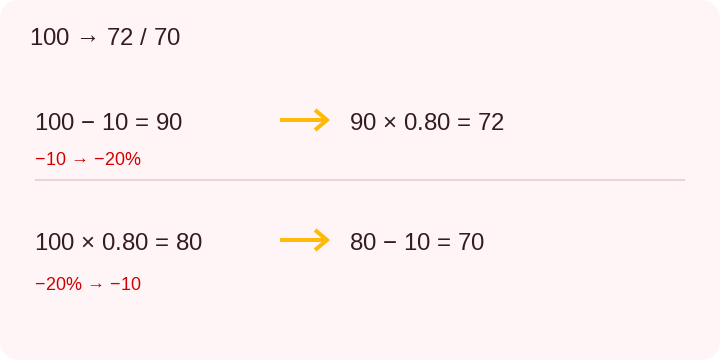
Two percentage discounts multiply their remaining-price factors. On 100, taking 20% off leaves 80; another 10% saves 8 and leaves 72. Actual saving is 28, giving an effective discount of 28%, not 30% and not the first coupon's 20%. The second receipt step explicitly uses the reduced price as its base. The coupon-order guide covers that distinction in detail.
Mixed coupons need their stated order. A fixed 10 off 100 leaves 90, then 20% off leaves 72. Taking 20% first leaves 80, then fixed 10 leaves 70. Swap coupon order lets you inspect both scenarios, without claiming that the retailer permits either one. A fixed coupon above the remaining unit price is capped at that price; unused value is not paid out and the receipt shows a warning.
Why can a discount differ by one cent?
The calculator offers two explicit percentage policies: round the saving, then subtract it; or round the remaining price, then derive the saving. Both use half-up rounding to the currency's minor unit. For 0.05 with 10% off, the saving is 0.005. Rounding that to 0.01 leaves 0.04. Rounding the unrounded remaining price of 0.045 instead gives 0.05, with a recorded saving of 0.00.
The policies differ at a half-unit boundary, so choose the one matching your hypothetical receipt. They are mathematical conventions, not a statement about every shop. Each discount step is rounded per unit before multiplying quantity; tax is rounded once on the selected total base. The visible receipt, copied summary, printed version and CSV identify the chosen percentage policy. Cash rounding, tax-inclusive price extraction and retailer-specific coupon rules are not modeled.
How do I add tax and delivery to a discount?
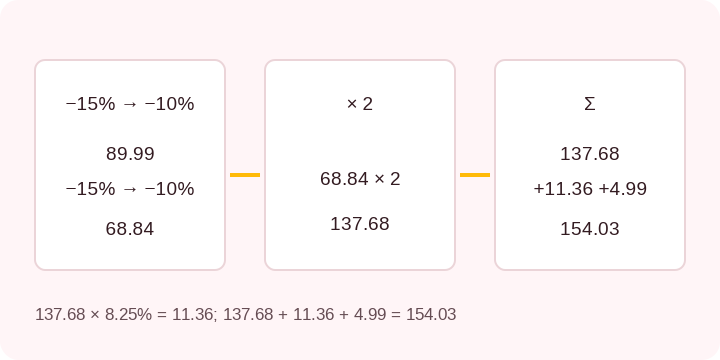
In the example, 89.99 at 15% becomes 76.49; a second 10% saving rounds from 7.649 to 7.65, leaving 68.84 per unit. Two units give 137.68. An assumed 8.25% tax on that merchandise subtotal is 11.3586, rounded to 11.36. Adding one delivery charge of 4.99 gives 137.68+11.36+4.99=154.03. Delivery is outside the tax base unless you select otherwise.
Including delivery in the tax base changes the assumption, not a legal rule. Actual tax rates, eligibility, coupon treatment and invoice rounding must be supplied by you. For an already tax-inclusive price, adding another rate would double count tax; this tool does not extract included VAT. The FTC online-shopping guidance encourages considering shipping and other costs when comparing prices. Enter another offer's complete delivered total in the same currency and quantity for a like-for-like difference.
How do I find the original price or percent off?
Percent off calculates (original−sale)/original×100 using unit prices. A hypothetical move from 100 to 72 gives (100−72)/100×100=28%. It rejects a sale price above the original rather than silently turning a markup into a discount. Quantity, second coupon, delivery and tax are excluded in this mode, and the irrelevant fields are hidden.
Original price uses one stated percentage or fixed discount. A sale price of 72 after 20% off gives 72/0.8=90 before currency rounding; adding 20% back to 72 would incorrectly give 86.40. A 100% discount cannot determine a unique original, including when the sale is zero. A fixed coupon reverses by addition, but a zero sale with a capped coupon is also non-unique. The reverse-price guide explains why rounded inverses are candidates, not historical proof; the tool also shows a forward check.
Which prices and rounding rules can I use?
I test the units, coupon bases and rounding separately before relying on a complex receipt. The table uses hypothetical values in two-decimal currencies unless it says otherwise. The examples compare coupon order, two rounding policies, tax bases and an original-price calculation. They are arithmetic controls, not real offers, claims about typical savings or recommendations to buy.
Currencies use their displayed minor-unit precision: JPY and KRW have no fractional input units here, KWD has three, and the other offered currencies have two. Changing currency changes labels and rounding units; it does not convert exchange rates. Monetary inputs use the selected point or comma separator, without grouping or currency symbols. Prices and charges are limited to one million, rates to 0–100 with four decimal places, and quantity to whole numbers from 1 to 1000.
| Hypothetical calculation | Expected merchandise or checkout result |
|---|---|
| 100, 20% then 10% | 72; effective saving 28% |
| 100, fixed 10 then 20% | 72 |
| 100, 20% then fixed 10 | 70 |
| 0.05, 10%, round saving | 0.04 remaining; 0.01 saving |
| 0.05, 10%, round remaining | 0.05 remaining; 0.00 saving |
| 100 at 20%, quantity 2, delivery 5, tax 10% excluding delivery | 181.00 total |
| Same inputs, delivery taxable | 181.50 total |
| 72 after one 20% discount | Original-price candidate 90 |
How do I save or compare my results?
The ring compares the unit merchandise price after discounts with unit merchandise saving. It deliberately excludes delivery and tax; the larger checkout card includes the supplied forward-mode additions. You can switch the ring's centre between price and saving. The effective percent uses actual rounded unit amounts, so a very small price can have an effective percentage different from the advertised rate.
Everything is calculated in the browser. Remember optionally stores up to ten complete input sets, including currency, coupon order, quantity, tax, delivery and rounding policy. Clear history removes them. Reset clears the current question while leaving deliberately saved receipts available. Copy and CSV retain the line amounts and rounding convention; printing includes the visible receipt. These are general arithmetic tools, not financial or tax advice, and they cannot verify a reference price, coupon acceptance or an actual checkout charge.
Compare the complete bill in the discount, tax and shipping guide.
Guides
 Stacked discounts: why coupon order changes the savingFollow two coupon bases and see why fixed and percentage reductions can change with order.5-minute read
 Reverse discount: recover the original price with roundingDivide by the remaining fraction, then check the forward receipt and the limits of a rounded inverse.5-minute read
 Discount, tax and shipping: compare the total you payCompare the complete delivered bill, with a worked receipt and a clear distinction between unit coupons and order vouchers.5-minute read
Frequently asked
Do 20% and 10% off add to 30%?
No. On 100, they leave 80 and then 72: a 28% saving before any minor-unit rounding effects.
Does a fixed coupon apply to the order?
Here each coupon applies per unit, before quantity. An order-wide voucher is outside this model.
Which tax rules does the calculator use?
Only the rate and tax-base assumption you enter. It does not determine legal tax rules or extract included VAT.
Is the recovered original price unique?
Not necessarily. Rounded sales can come from several original prices; 100% off cannot recover a unique original.
Does switching currency convert money?
No. It changes the currency label and minor-unit precision without using exchange rates.